
Introduction
This is a reference document for EASE REST API
This REST API is for developers who want to integrate EASE with other applications
Some of the things you'll be able to do are:
- Retrieve list of findings
- Update finding information (status, comments, etc..)
- Retrieve list of audits
- Retrieve list of users
Support
For questions or feedback, please email support@ease.io
We'll be looking at adding more functionality, so your feedback is greatly appreciated!
Prerequisites
- Credentials to EASE platform with admin-level access
- Public API feature enabled for your organization
- An understanding of RESTful APIs and using JWT access tokens
- A high-level understanding of EASE roles and scopes
Getting Started
- Login to the standard EASE application using your EASE credentials
- In the Organization > Users section, create a new user profile
- Select "Create API User"
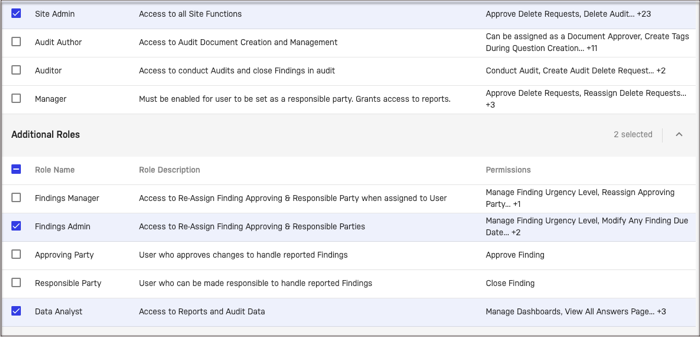
- Select the site, scope, and roles for your API user. The recommended roles are:
- Site Admin - To view list of sites, users, and programs
- Findings Admin - To update any findings that are within scope
- Data Analyst - To view list of findings and audits that are within scope
- Keep a copy of your
Client IDandClient Secret -
Note:
Client Secretcannot be recovered, but can be regenerated
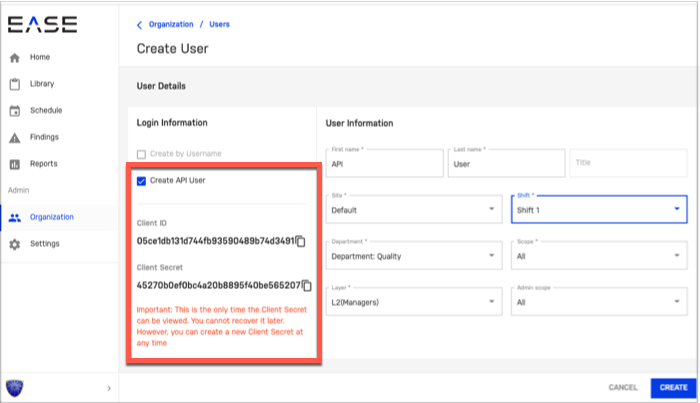
- Click Create to complete creation of your API user
Next Steps
Review API Tutorials section to see some sample code
Comments
0 comments
Please sign in to leave a comment.